
Vantage Workspace · for security and IT leads
For security and IT leads.
Runs on a server your firm controls. Your data and your model stay yours. If you'd like us to run the server for you, it sits in the country you choose, for your firm alone.
In Vantage Workspace, AI Workers are named staff in the system. A person approves anything that touches money or leaves the firm, and one record shows what happened.

Why it matters
When an AI agent speaks, your company speaks.
CNBC International recently published a video about the people firms are hiring to manage AI agents. One line in it stays with the person who has to answer for those agents:
“When an AI agent speaks, your company speaks.”
A guest in the same video adds:
“For every agent, you might need a workforce that actually manages those agents.”
Both lines are in Why AI Agents Orchestrators Are In High Demand, from CNBC International. If an agent writes to a client, the client hears the firm. The rest of this page shows what you can open and check yourself, in a worked example on made-up data.
01 · Approvals
A person approves what matters.
Ask the Chief of Staff to pay a bill and it stops. It names the amount, the payee and the bill, and tells you nothing was paid. The request waits for the person who decides payments. A message that would leave the firm waits the same way, with Reject and Approve.
AI Worker · Billing






02 · The workforce
Your AI Workers, and who manages them.
The Workforce page lists every AI Worker with its role, its status, and what it spent today: spend, calls and its daily limit. You can pause or retire a worker from the same page. A paused worker shows as paused, and the pause is written to the log with the person who did it.
The Chief of Staff is built in. Its card reads:
“Built in. Hands work to the AI Workers; it cannot send, approve or spend.”
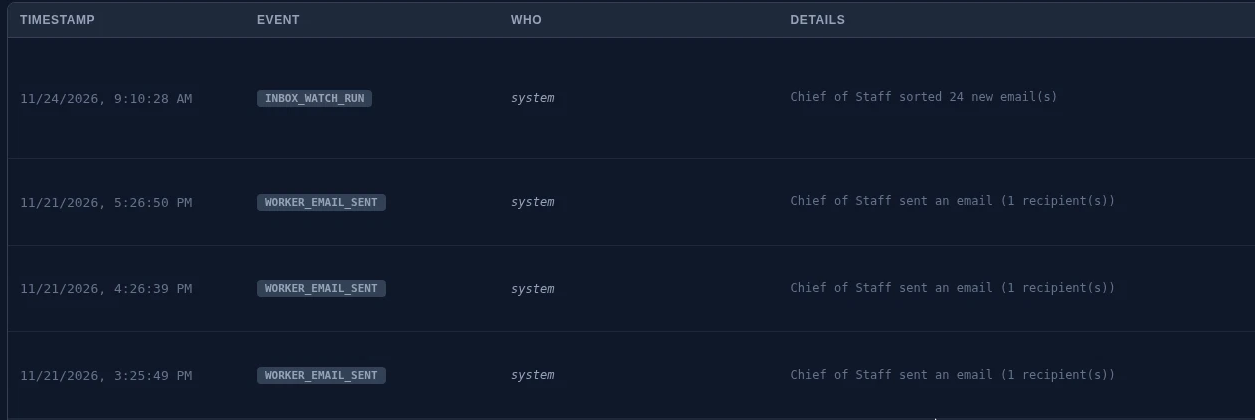
When the Chief of Staff hands a task to another worker, that hand-off is written to the log: who asked, which worker it asked, and the reply. A person's own request from the Desk is logged the same way.
03 · The record
One record you can open.
Every action goes into one audit log. The audit page shows a status row for the chain, "Chain intact: ... rows chained, no breaks", followed by the newest outside timestamp and the time it was last checked. Your own sign-in opens the whole log, with search, not only your own activity.
The Export button's tooltip reads: "Download what this view shows (up to 5,000 rows) as JSON and CSV". The export does not carry the chain hashes. The full chained log and its archive sit on the server and are checked on your server with the chain verifier.
04 · Your tools
Your logs, in your tools.
You can stream audit events to your own SIEM: Splunk, Sentinel, Datadog, syslog or a webhook. Events wait in a queue on disk until they are delivered. The setting page reads: "SIEM Event Targets. Stream audit events to your SIEM of choice. All requests use HTTPS; webhook bodies are HMAC-SHA256 signed when a token is set."
05 · Sign-in
Sign-in and sessions.
Sign in with your own identity provider (OpenID Connect: Entra ID, Okta, Google Workspace and others). Two-step sign-in can be required for administrators. "When this is on, every administrator and security account must set up an authenticator app at its next sign-in. AI Worker accounts are never affected."
A sign-in lasts 12 hours. The gateway signs you out after 60 minutes idle, and administrators can end one person's sessions, or all of them.
06 · Roles
People see only what their role allows.
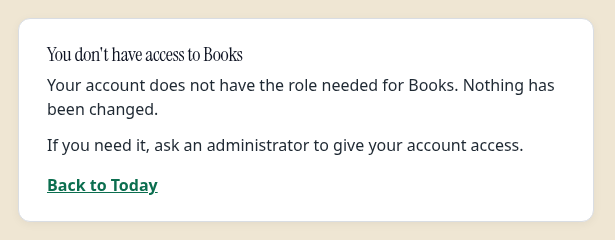
A member of staff who opens a screen outside their role gets a plain refusal. Books: "You don't have access to Books. Your account does not have the role needed for Books. Nothing has been changed."
The security role has a read-only view. Provider keys can be added or changed only by an administrator.
07 · Hosting
Your server, your data, your model.
Runs on a server your firm controls. Your data and your model stay yours. If you'd like us to run the server for you, it sits in the country you choose, for your firm alone.
Your files, mail, chat, books, records, memory and audit log are stored on the server your firm controls. What leaves it is what you switch on: the text of a request to the AI provider you choose (none with a local model), outside email through your mail relay, and a fingerprint for the audit timestamp.
You choose the model, and you bring your own provider keys: "Bring-your-own-key for AI model providers. Keys are encrypted at rest and never leave your deployment."
08 · Releases
Releases you can verify.
The installer checks the release signature before it unpacks anything, and checks every image signature. It refuses a bundle that was not signed by HANDVANTAGE's key. Admin > Fleet shows each installation's build with "Verified Yes".
What these screens are
The checks on these screens are the platform's own. They show what the system did and what it refused. They are not a certificate and not an audit result.

A short walk-through.
If you look after security or IT, ask for the one-page security summary and a short walk-through. You will see the screens above on a worked example with made-up data.
If your team would like to practise a decision under pressure, CyberDrill is a separate product built for that.